Order & Receipt Data

The final step is the MOST important because the order number is vital data for this project. Please remember, you must make a purchase every visit and get a physical receipt.
After you make your purchase, you'll take a picture of your receipt and use the receipt to finalize your data submission.
From the receipt you will enter:
- Visit date
- Visit time (from time stamp on the receipt)
- Order number
Visit Date & Time
This information is easy to obtain from the receipt. If you complete multiple visits, be sure to upload the correct receipt from the visit window.
Order Number
It's important to note there are usually two numbers on the receipt, one that we want, one that we can ignore.
There will be a longer number directly under the time stamp. This number is usually 5-6 digits. This is not the number you want to enter.
What we are after is the Order number. The order number will usually say ORDER and always have a # in front of it. These numbers tend to trend between 200-500. If you number is substantially outside of this range, please send a support ticket with a photo of your receipt to the research team for assistance.
In this example, the number we want is 437 (in the red box). The number we do not want is 10340 (in the blue box).
Tip: You may run into a situation that you need to have the receipt reprinted. Sometimes, the receipt is not legible, the cashier may forget to print you a receipt, or may throw it away instead of giving it to you. In these instances, you must request a reprint of the receipt. The receipt will likely indicate that it is a reprint:
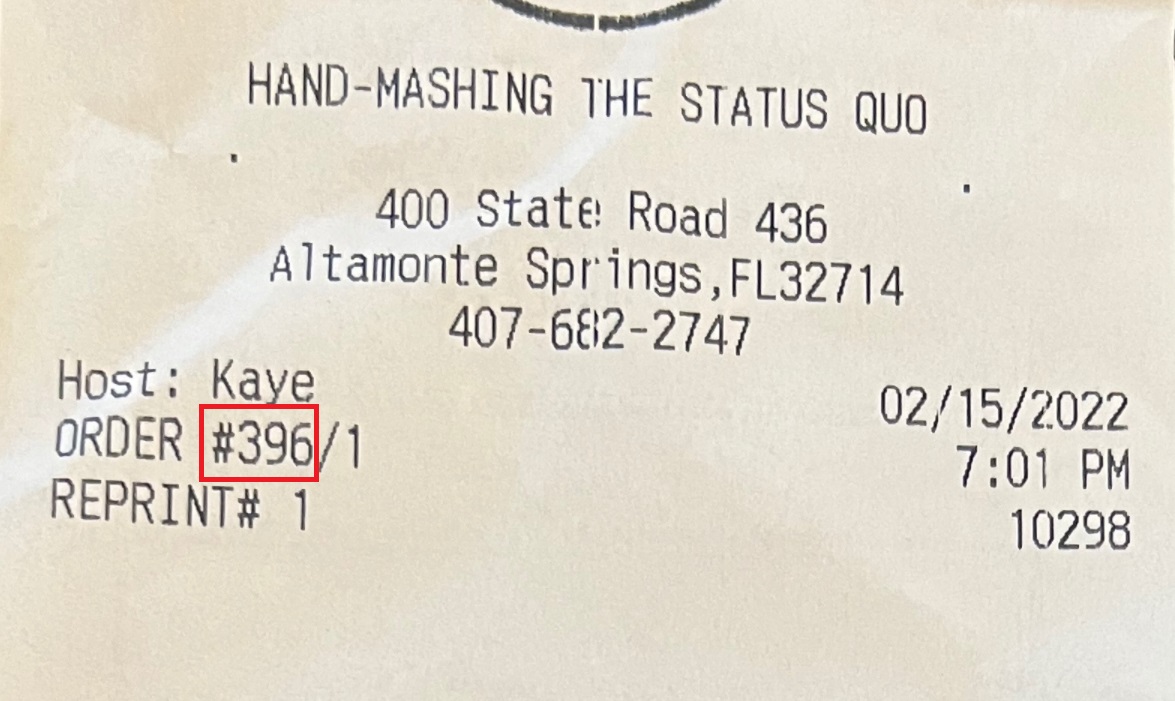
If your receipt looks like this, disregard all digits after the forward slash. In this example, you only need to record "396" as your order number. Do not input "/1".
Comments
0 comments
Please sign in to leave a comment.