Stockouts

We will be also asking you to collect information on product stockouts. A stockout is any instance were an item—any item—was not available to be purchased because it was not on the shelf in its given space.
We will be investigating only Hard stockouts for inventory only.
A Hard stockout is any case where all of a given item was sold and now there are none left on the shelf—product is not available to the immediate left/right/up/down. (It is important to look at shelf tags! Make sure you still include the linear inches of where the product should be.)
We don't care about stockouts on display items— display items cannot be purchased - they are unwrapped so a customer can actually use and test the product. Inventory is purchasable; it is in it's proper packaging and can be taken to the register to purchase. We want stockout counts for inventory only.
For example, say you encounter the display below in the picture. In the blue circle, there is a product missing. Since this item is a display item, we DO NOT consider this a stockout.
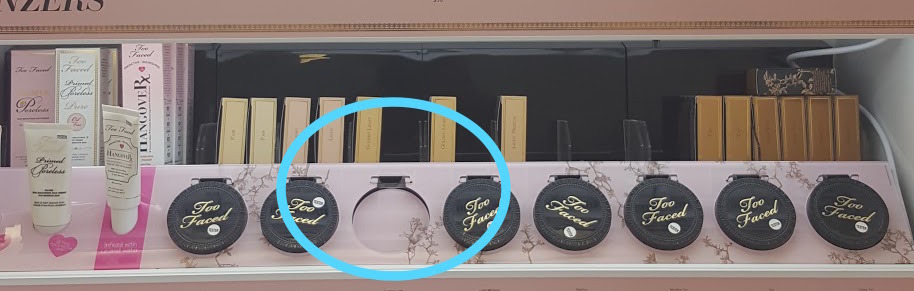 We WOULD however consider the empty slots BEHIND the display items stockouts.
If you see a stockout, first make sure the item belong to one of the six product categories we are collecting data on. If it doesn't, then ignore it! If the stockout is on an item that belongs to one of the six categories, then all you need to do is count it! You will simply just be tallying the total number of stockouts for each product category by brand.
You DO NOT need to collect any additional information such as price or description. It is just a count!
Comments
0 comments
Please sign in to leave a comment.